ASAPP · 2022–2023
AI Coaching for Agents
Real-time, AI-powered coaching for contact center agents — nudges, checklists, and guided workflows delivered in the flow of live conversations, without interrupting them.
Led design and research strategy for ASAPP's real-time agent coaching product, from concept through production rollout.
Designed and led a concept-testing study and shadowed live agents at a contact center, used to validate direction before committing to a build.
Built the AA Framework, a know/say/do/interact model that reorganized the product around agent intent and became the team's lens for roadmap and scoping decisions.
25% reduction in time to proficiency in pilot data, rolled out to a Fortune 500 client with 1,200+ agents.
Findings fed ASAPP's strategic pivot from point-solution coaching toward platform-level, autonomous agent capabilities.
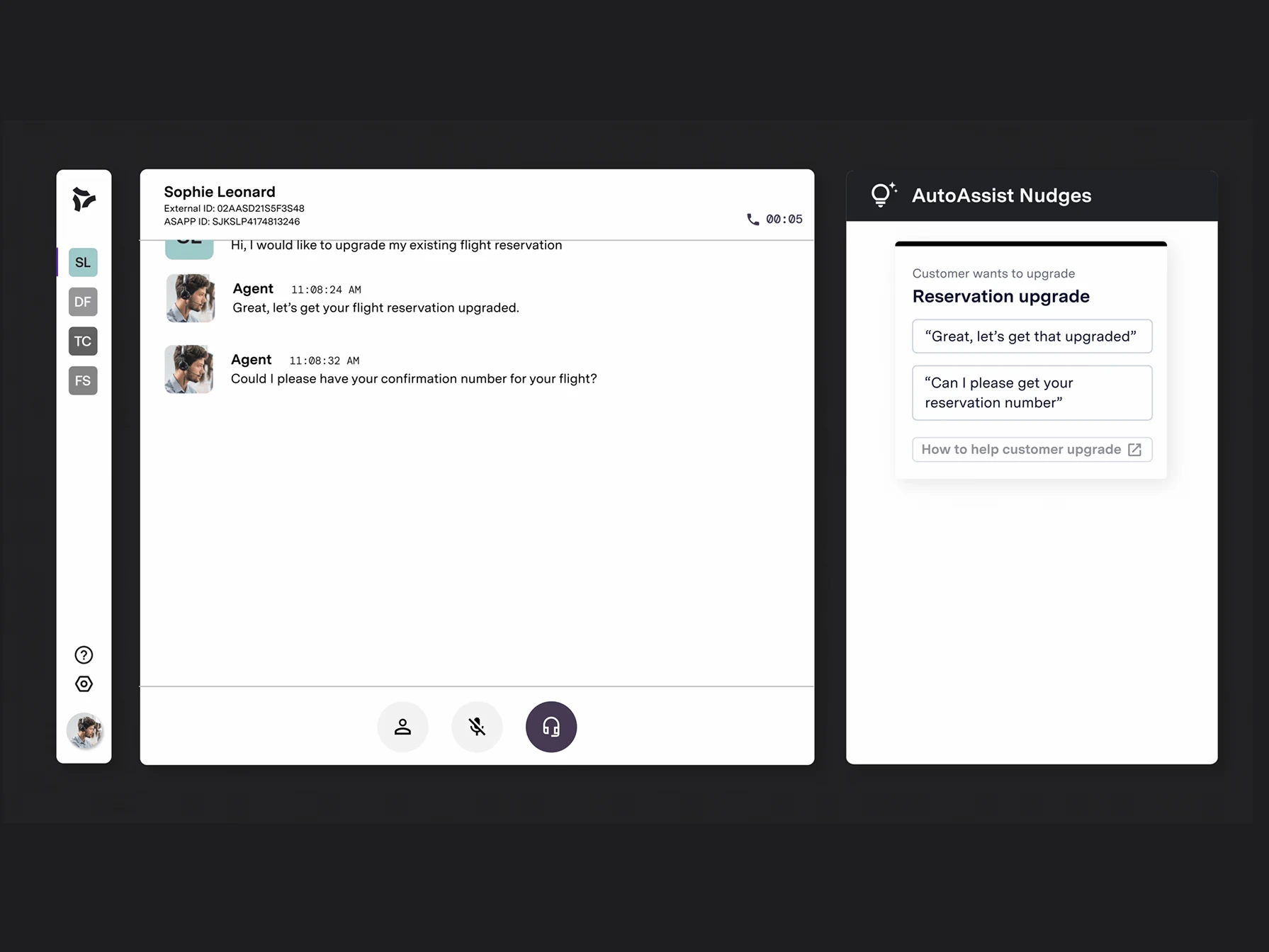
AutoAssist running alongside a live customer call: nudges and checklist surfaced in real time.
Context
ASAPP builds generative AI products for large enterprise contact centers, with a focus on improving customer experience, making agents faster and more consistent, and giving them better support during complex interactions. There are roughly 265 billion human-assisted customer service contacts a year, and the performance gap between a top agent and a bottom agent can run as high as 3x. That gap shows up as lost revenue, inconsistent customer experience, and real operational cost: high turnover, slow ramp-up, and coaching that's too time-consuming and reactive to close the gap before it does damage.
Part of what made the gap so persistent was how long the path to proficiency actually was, and how little support existed along it. Training covered the basics, but everything after that, ramping up, becoming a novice, growing proficient, eventually performing at a high level, happened mostly unsupported, with agents leaning on team channels or just muddling through.
The agent path to proficiency: training and ramp-up are structured, but the novice-to-proficient stretch, where most of the performance gap lives, was historically left to team channels and self-direction. Recreated and condensed from internal ASAPP research, original stages and detail simplified.
AutoAssist was ASAPP's attempt to bring real-time AI coaching directly into that unsupported stretch, into the flow of a live call: could supporting agents in the moment, instead of after the fact, dramatically improve performance and reduce the burden on supervisors?
Objectives
The business objectives, and the metrics tied to each, drove most of the strategy and experience decisions that followed:
Give new agents the support they need to succeed
Measured by reduction in time to proficiency.
Drive a more consistent brand experience
Measured by process adherence rate.
Increase the efficiency of new agents
Measured by average handle time (AHT).
Increase the effectiveness of all agents
Measured by first-call resolution and close rate.
Improve the customer experience delivered by all agents
Measured by CSAT and NPS.
Give supervisors time back
Measured by agent-to-supervisor ratio and supervisor churn.
My role
I led UX strategy for AutoAssist: conducting foundational research, facilitating the design sprint and concept testing, designing the end-to-end UI and interactions, and collaborating cross-functionally across product, research, engineering, and sales and customer success. I also supported pilot rollouts and GTM alignment as the product moved toward enterprise clients.
When I joined, the MVP was already in flight. The team was focused on visual polish and output, not on whether the product actually supported agents in a way that changed their performance. I saw the gap and pushed for foundational research with agents and supervisors, asked a lot of questions the team hadn't yet asked, and bought us the space to revisit the strategy and experience before going further.
Resetting the direction
To get the cross-functional team aligned around a shared vision, I led a design sprint with the VP of Design, the PM Director, engineering leads, data science, and customer success in the room. We combined prior qualitative agent interviews, stakeholder workshops, rapid concepting, and targeted UX research across nudges, the knowledge base, UI automation, and agent workflows. We mapped the full call journey, identified the highest-friction moments, and tested concept directions against them, all to get everyone aligned on one coherent vision that served both business and agent outcomes.
In parallel, I ran a structured competitive analysis across six categories AutoAssist touched: nudges, checklists, workflows, goal setting, scorecards, and on-demand assistance, cataloguing products like Cresta, Balto, Airin.ai, Five9, XSELL, Uniphore, and Pega against each. Patterns emerged by category rather than by company: checklist tools tended to auto-check items off a knowledge-base-ranker-like mechanism rather than relying on agents to self-report completion, and workflow tools were strongest when they integrated knowledge base content directly into the step-by-step flow instead of treating search and guidance as separate experiences. Both observations directly shaped how AutoAssist's checklists and knowledge suggestions ended up working, automatic completion detection over manual check-off, and KB content surfaced inline rather than as a separate search destination.
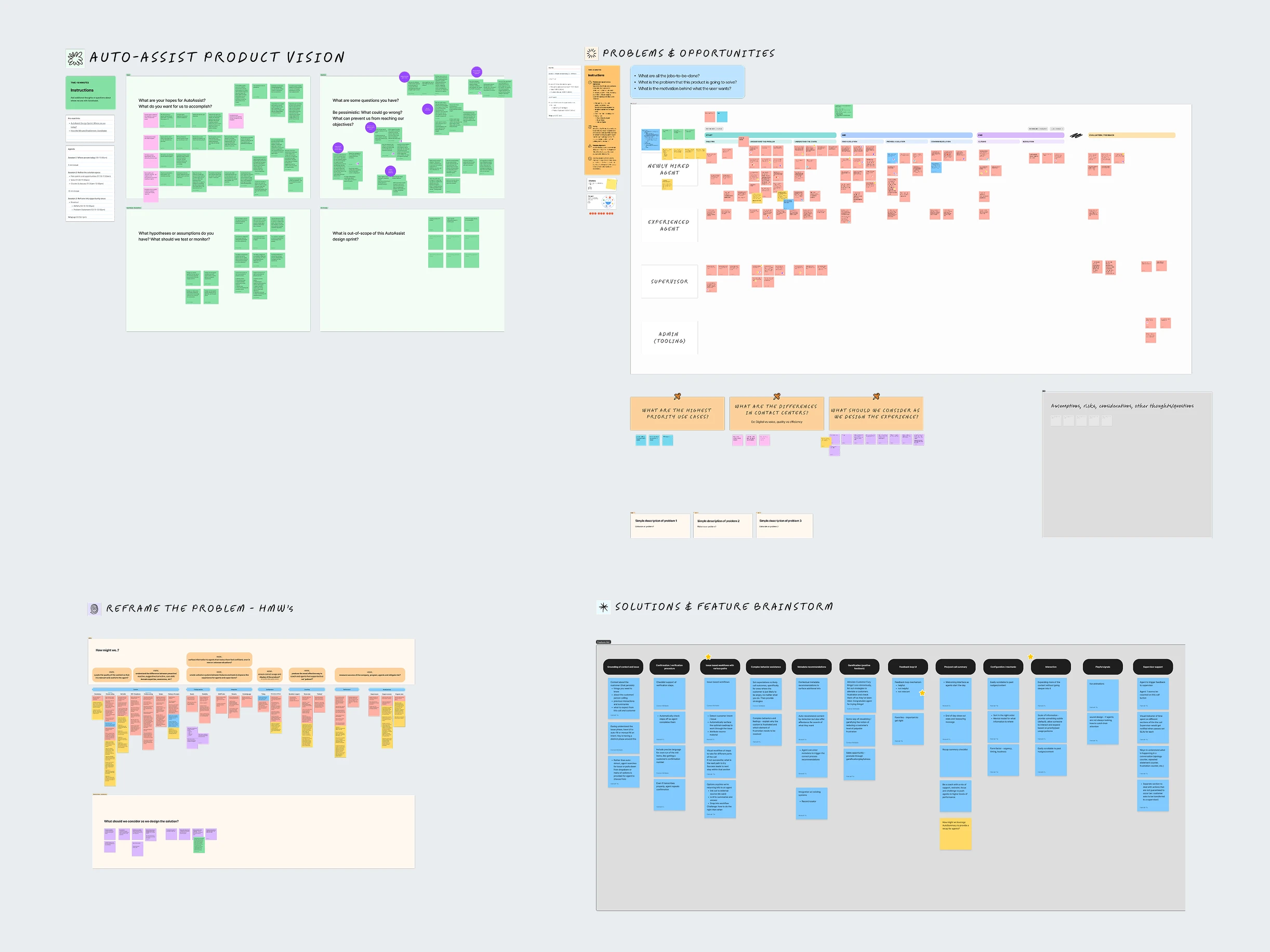
Research synthesis: product vision intake, problem mapping by persona, reframed "how might we" questions, and feature brainstorm.
What the research surfaced
Alongside the sprint, I sketched extensively, reviewed customer policy documents, and traveled to a contact center to shadow live agents on the floor. I was working through which workflows were complex, repetitive, or error-prone, what drove long handle times or follow-up calls, which tasks agents had to complete on every call versus only certain call types, and where agents were struggling without support. The visit ran off a structured discovery framework I helped put together with customer success, covering agent background and tool usage, ASAPP-specific feedback, and separate questions for coaches and team leads on coaching, onboarding, and reporting, so what we walked away with was comparable across agents rather than a handful of disconnected anecdotes. Watching real calls, instead of reading about them secondhand, surfaced friction the prototype reviews alone wouldn't have: where agents actually looked when they were stuck, how often they toggled between systems, and how much of the job was muscle memory versus active decision-making.
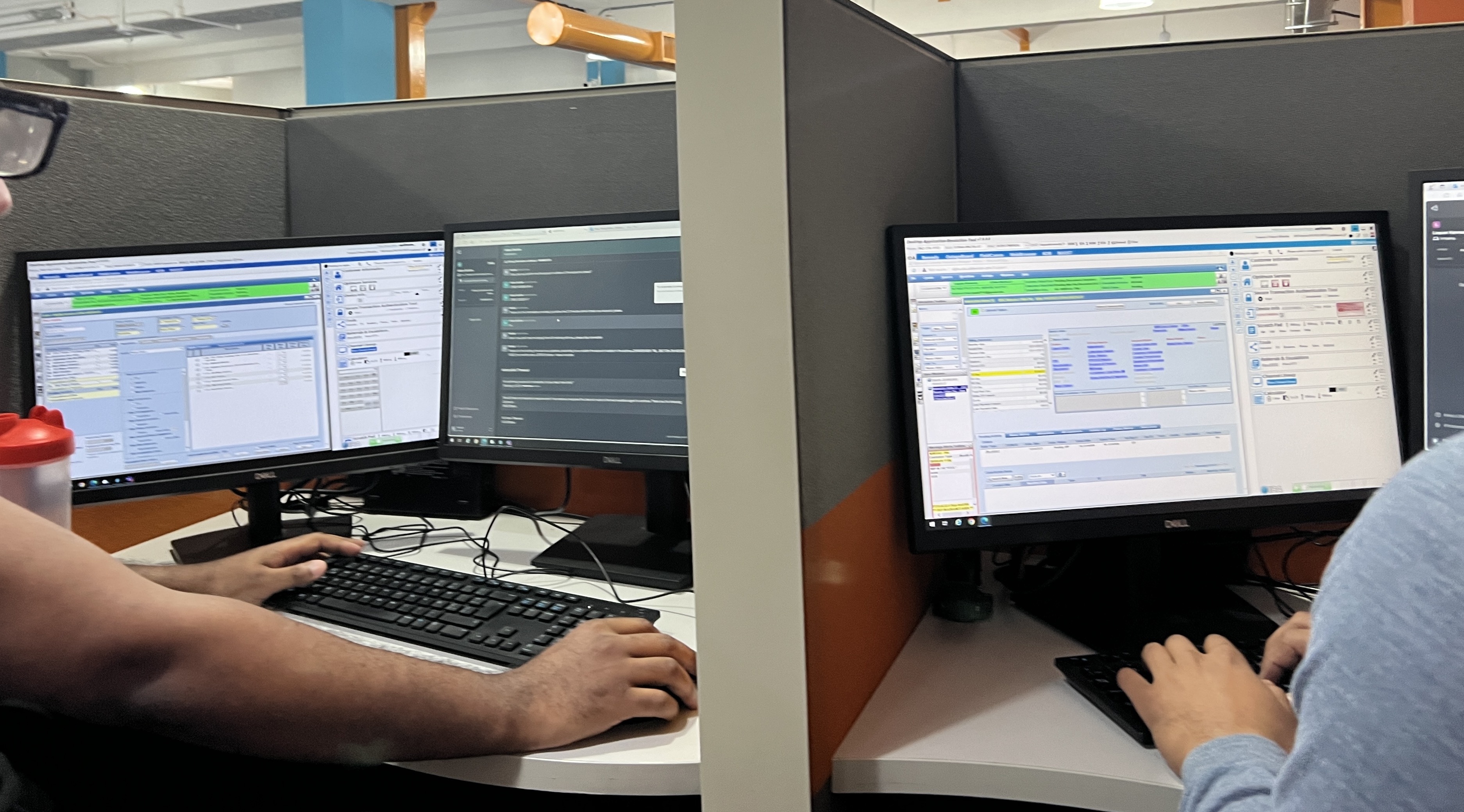
On the floor during the site visit: agents working their actual desktop setup, multiple monitors and tools in play on every call.
To validate direction before committing to a build, I designed and led a research study with unmoderated concept testing on usertesting.com: 16 participants working in customer service or technical support, at companies with 1,000-plus employees, imagined themselves as agents on a fictional call and reacted to a sequence of still prototype screens rather than a single static mockup.
Four findings shaped nearly every feature decision after this: agents need trustworthy, contextual help, not generic scripts. Timing is critical, guidance gets ignored if it arrives too early or too late. Cognitive load is already high, so support has to be lightweight and scannable. And supervisors need real visibility into whether the guidance agents were getting was actually effective.
Building an opinion on what to recommend
Nudges, checklists, and knowledge suggestions had been built around how each was technically configured, behavior detection, UI events, or knowledge base retrieval. That was an engineering-centric way to organize the product, and it made it hard for anyone, including the team, to reason about what AutoAssist should actually recommend to a given customer or agent type.
I built a framework that reorganized the product around agent intent instead: did an agent need to know something, say something, do something, or interact with something. Each of those intents mapped to a specific capability (real-time prompts, scripts, checklists, UI automation), and each capability was tied back to the business outcomes it was meant to move, first-call resolution, average handle time, CSAT, compliance adherence, so a feature recommendation could be defended in terms of the problem it solved rather than the mechanism that powered it.
That framework became the lens for prioritizing the roadmap and for scoping new client deployments: instead of asking which detection method to use, the team could ask what the agent needed to know, say, do, or interact with in that moment, and work backward from there.
Design principles
These principles came directly out of the research, guided every design decision, and gave the team a shared way to evaluate new feature ideas and prioritize the roadmap:
Assist, don't interrupt. Guidance had to support the conversation, not derail it.
Actionability drives value. A prompt was only as good as the next concrete step it gave an agent.
Trust requires correction paths. Agents needed a way to flag or dismiss guidance that was wrong, or trust in the system would erode fast.
Keep guidance lightweight and scannable. Anything that took real cognitive effort to parse mid-call wasn't going to get used.
Reliability over polish. A plain prompt that fired at the right moment beat a beautiful one that fired at the wrong one.
Meet agents where they are. A new agent and a tenured agent needed fundamentally different levels of support from the same system.
Defining how a Nudge behaves
Before designing the component, I wrote the behavioral logic it needed to satisfy: nudges appear in reverse chronological order, stay relevant to what's actually happening in the conversation, and are timed to interrupt as little as possible while still making sure something important gets addressed. Nudges that weren't pinned or saved by the agent were non-persistent, timing out automatically if the agent hadn't addressed them, with a separate delay window after that timeout so the same nudge couldn't immediately re-trigger and turn into noise.
That logic doc fed directly into the component anatomy I designed: a trigger description explaining why the nudge appeared, a primary message stating the action to take, optional verbatim prompts the agent could read aloud, and an optional link to a resource. I also worked through how the card needed to behave across edge cases: long primary messages, zero prompts versus one, completed states, and critical-priority items reserved for compliance-level alerts.
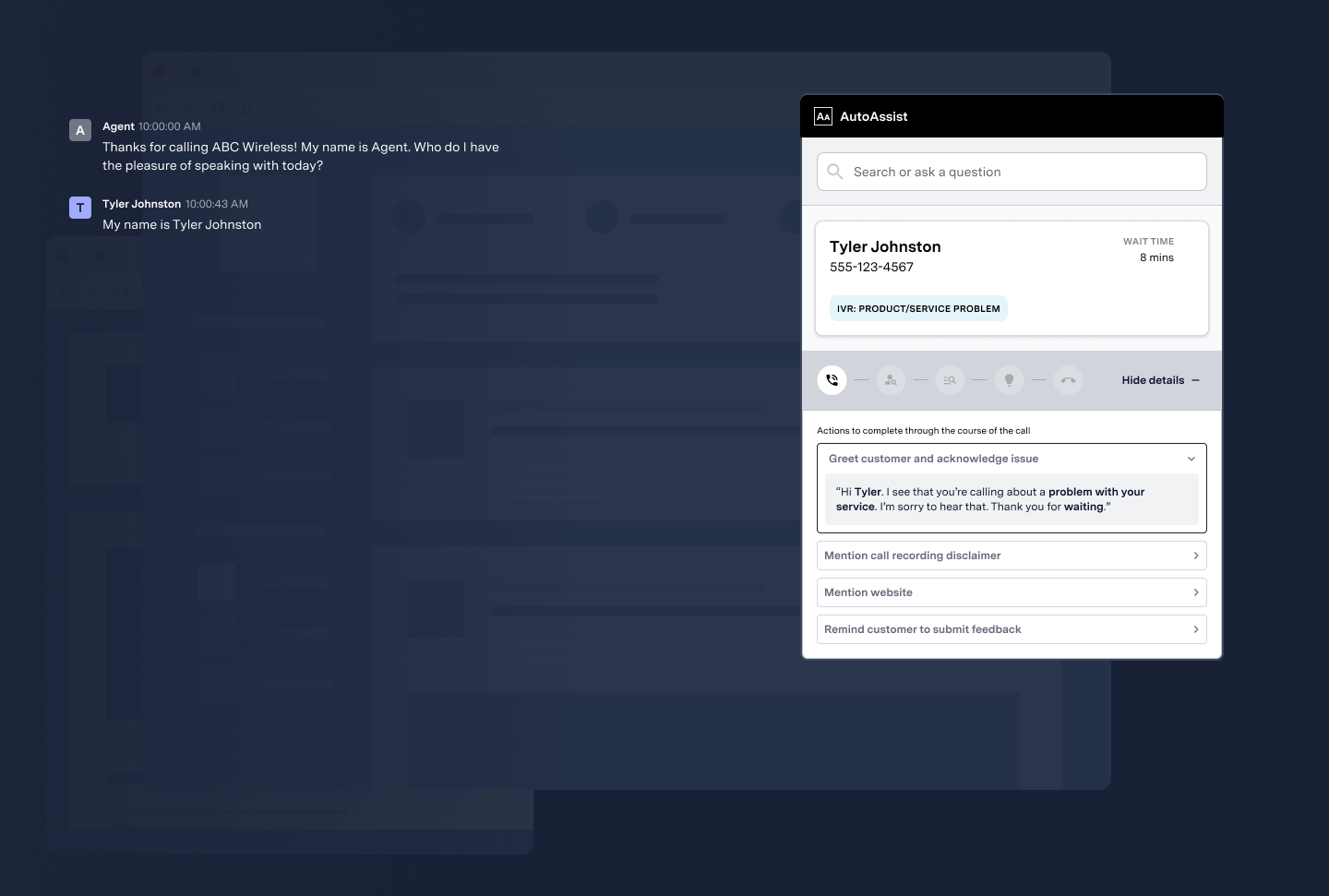
A nudge in its simplest form: trigger description, primary message, and the script it generates for the agent at the start of a call.
Stacking was its own design problem. A compliance-required SOP nudge and a sentiment-driven nudge could both become relevant within seconds of each other, and the panel had to handle that without burying either one. Pinning kept the higher-priority SOP nudge in place at the top while a second nudge surfaced underneath it, so an agent working through a recorded-disclosure requirement wouldn't lose it the moment the conversation shifted and a "customer sounds upset" nudge appeared.
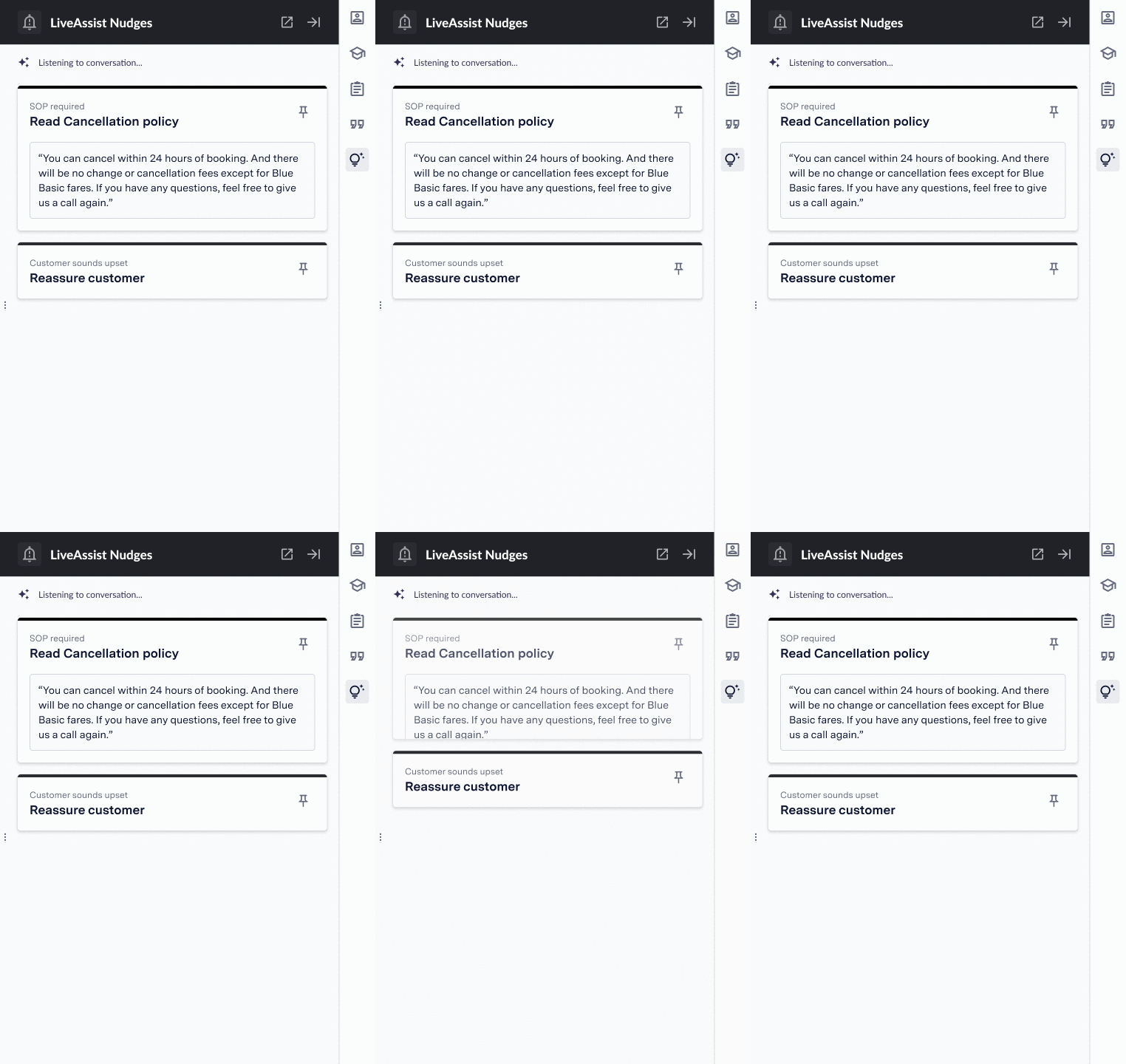
Two nudges live at once: a pinned SOP requirement holding its position while a second, sentiment-triggered nudge surfaces below it.
Underneath every nudge sat a behavior: real-time detection defined by speaker, quality (positive, neutral, or negative, for reporting), and a triggering rule built from keywords, regex, or trained example utterances, run against the live call transcript rather than a static script. "Trust requires correction paths" wasn't just a principle on a slide, it showed up directly in this layer: every behavior was inspectable and editable by an admin, not a black box the agent had to take on faith.
Building this for voice instead of chat raised the difficulty by an order of magnitude. A chat product reasons over clean, typed text. AutoAssist had to reason over a real-time transcript of a phone call first, so every nudge was only as reliable as the transcription underneath it, accents, crosstalk, and background noise could all introduce errors before detection even started. On top of that, sentiment had to be read correctly in the moment: a behavior like "agent expresses empathy" depends on getting tone and intent right, not just matching words, and getting that wrong in either direction, false positives or missed moments, was the fastest way to lose an agent's trust in the tool.
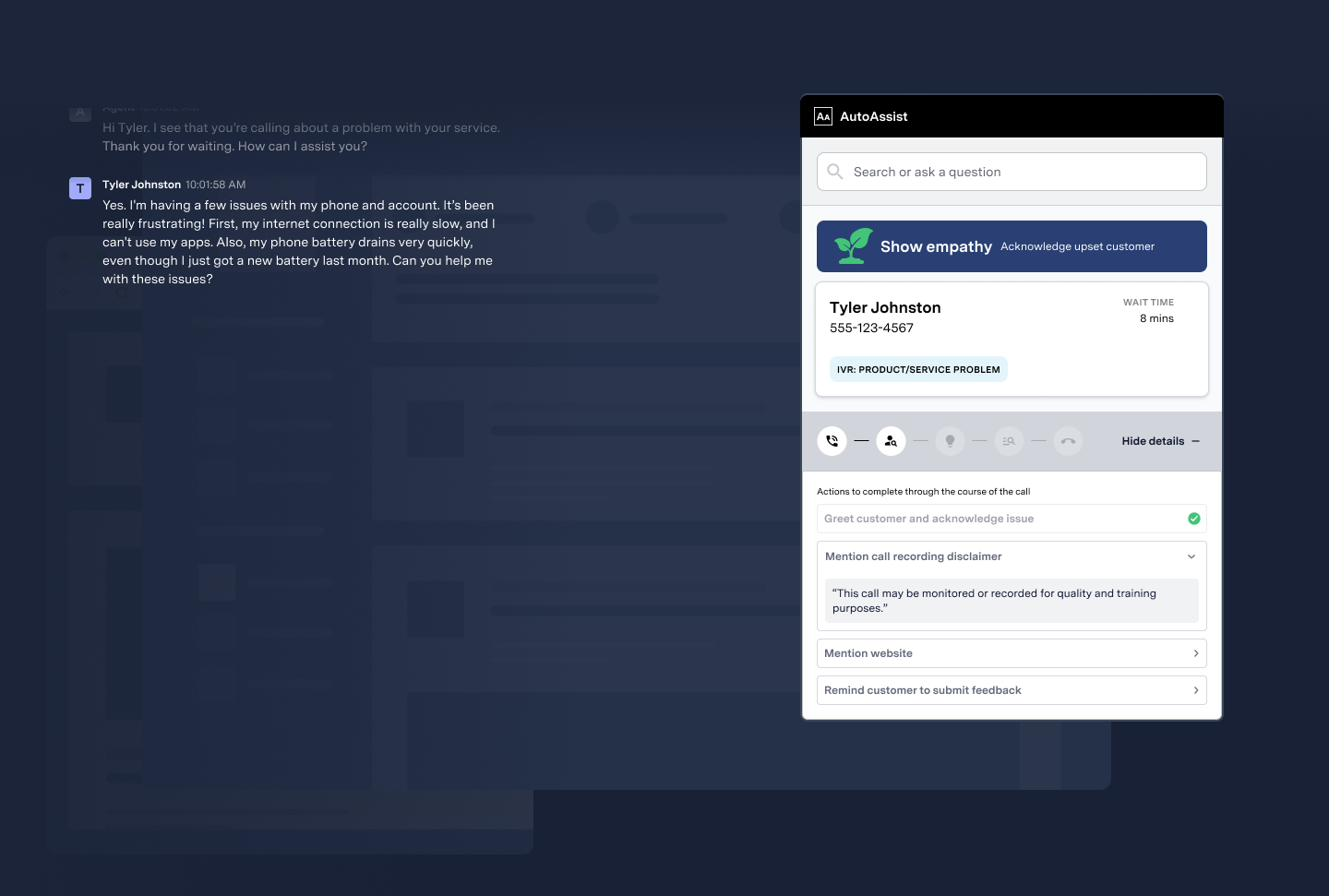
A behavioral, sentiment-driven nudge in action: detecting an upset customer mid-call and prompting the agent to acknowledge it, not just match keywords.
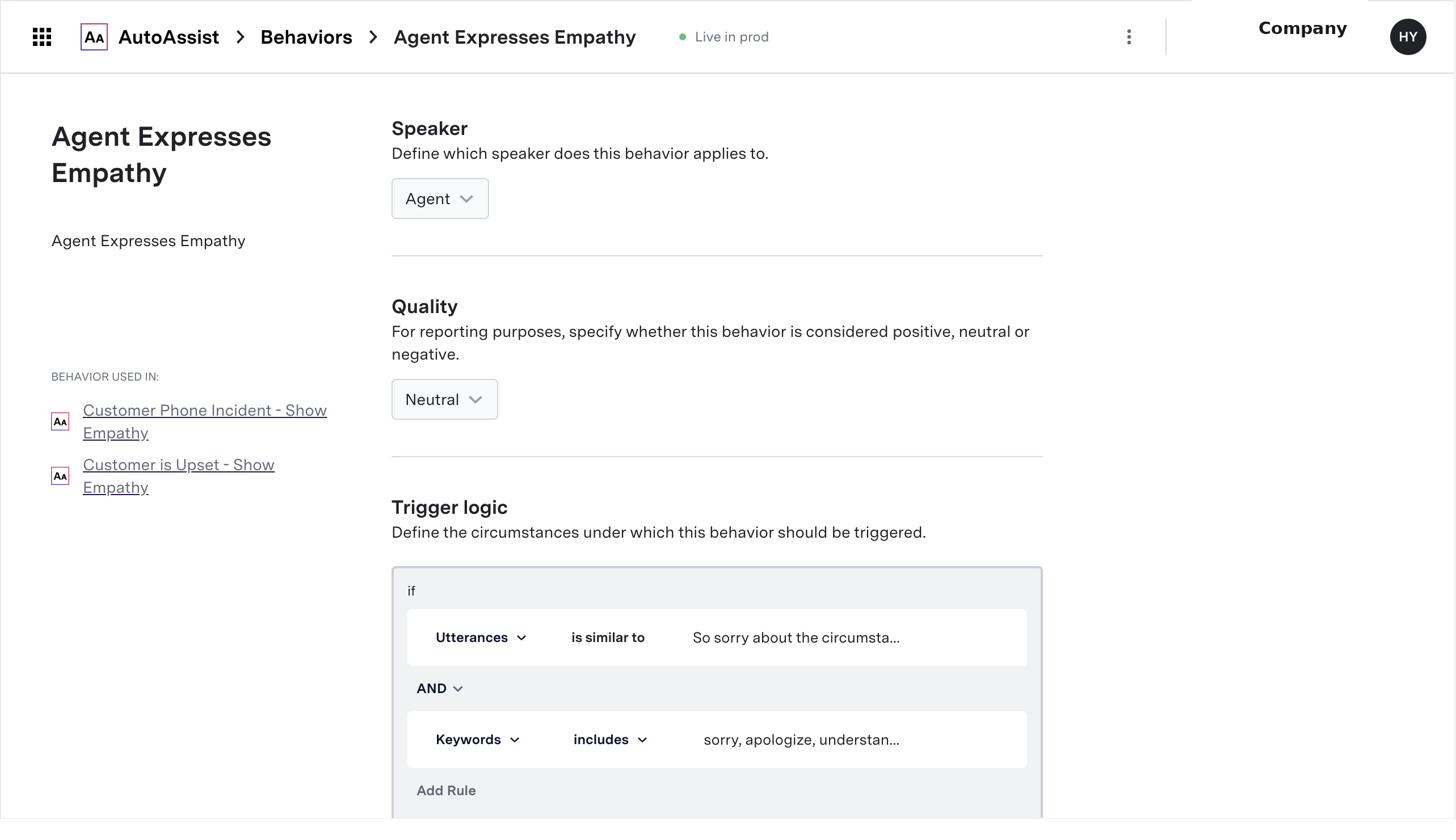
A behavior definition in production: speaker, quality classification, and the rule combining utterance matching with keyword detection that triggers it.
By the time this was running for a real enterprise client, dozens of nudges built on behaviors like this one were live in production, covering everything from compliance disclosures to soft-skill coaching moments.
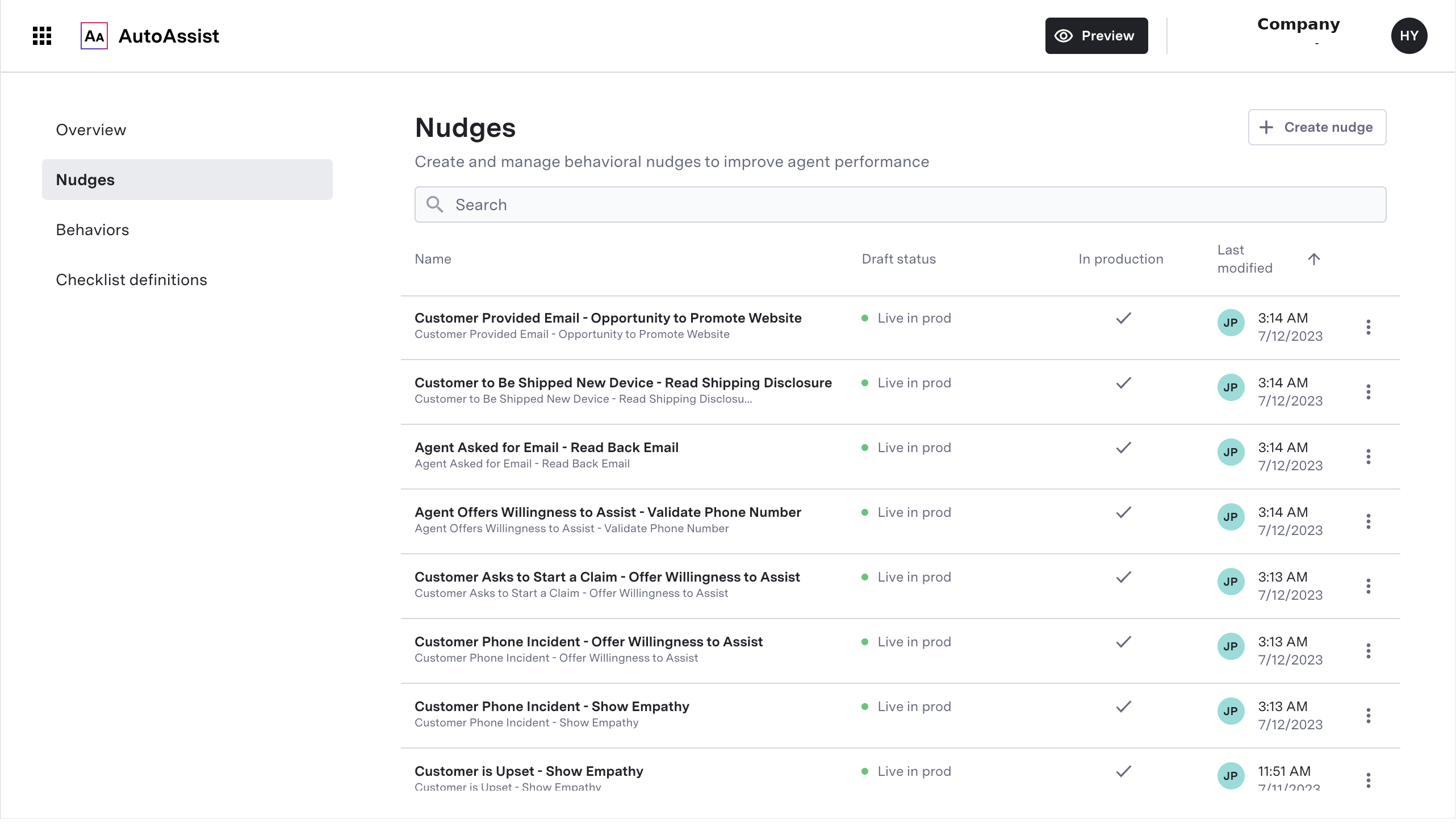
A subset of nudges live in production for an enterprise client, spanning disclosures, verification steps, and soft-skill coaching moments.
A nudge could also do more than prompt a line, it could branch. A recommendation nudge would surface an upsell or service option, require the agent to confirm intent and read a compliance disclaimer verbatim, then route to the specific configuration the customer chose, with a link to complete the action in the system of record. This is "trust requires correction paths" and "actionability drives value" working together: the agent isn't just told what to say, they're walked through the decision and given a way to act on it without leaving the call.
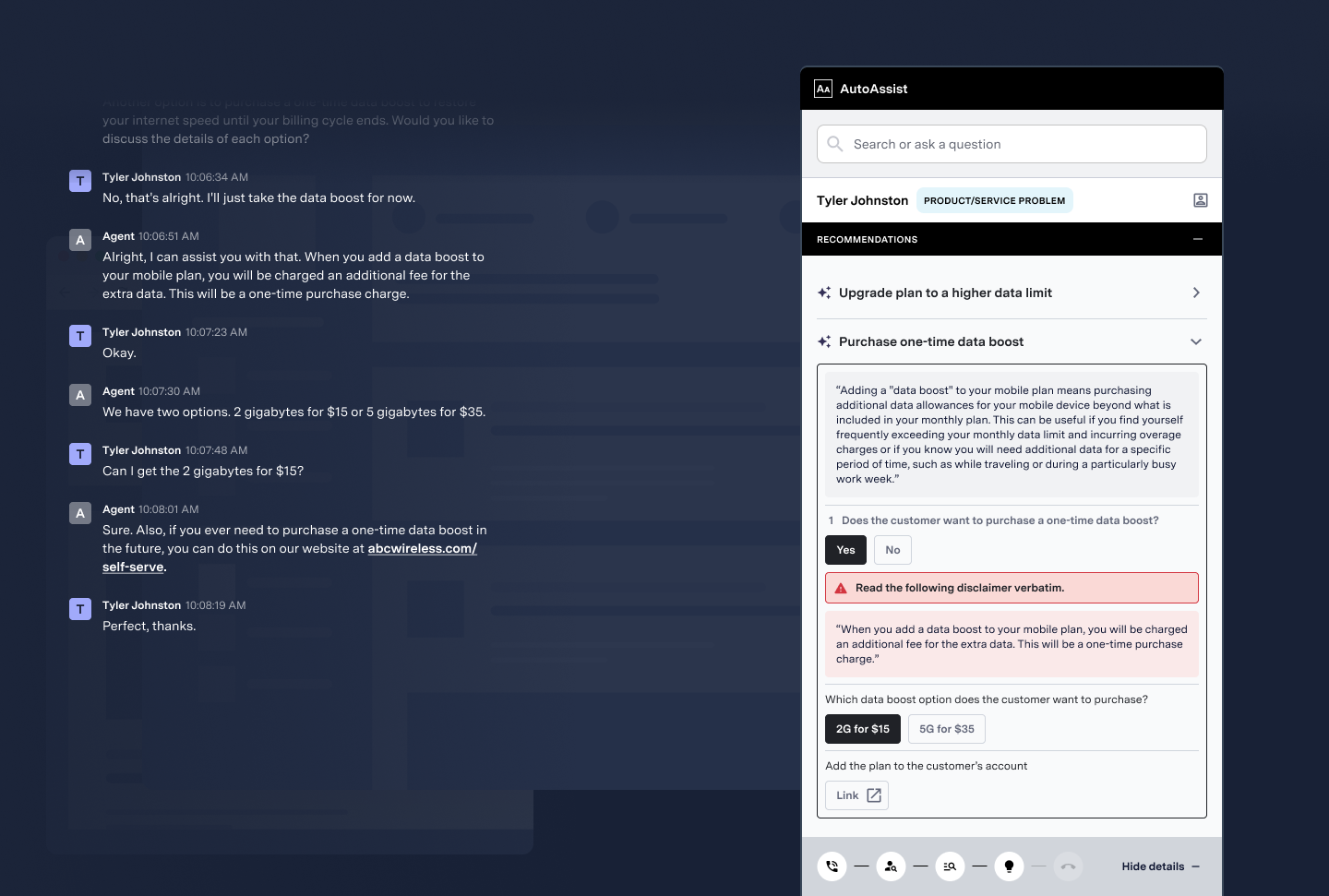
A branching recommendation nudge: confirm intent, read the compliance disclaimer verbatim, route to the specific option, then act on it directly.
What shipped
I designed three capabilities, mapped back to the know/say/do/interact framework: nudges covered know and say, checklists covered do, and knowledge suggestions covered interact, retrieving and acting on information without leaving the call.
Nudges
Real-time behavioral prompts, contextual and timely, configurable per behavior and call type. Agents could mark each nudge positive, neutral, or dismiss, feeding directly back into how the system was tuned.
Adaptive checklists
Complex workflows broken into discrete steps, auto-completing via events or AI triggers, with manual check-off available for flexibility. Routed by call type or agent so the right checklist showed up in the right context.
Knowledge suggestions
Relevant knowledge base content surfaced mid-call, with search terms pre-populated based on the conversation. Context-aware retrieval that cut search friction instead of asking agents to type their own query.
A no-code platform for supervisors and admins
Designing a good agent experience wasn't enough on its own. Supervisors and admins needed real control, since every client had different policies and behaviors to support, and none of it could depend on engineering being available. I built the platform around three areas, one for each leg of the framework that needed its own configuration surface: nudge configuration, checklist building, and knowledge support settings.
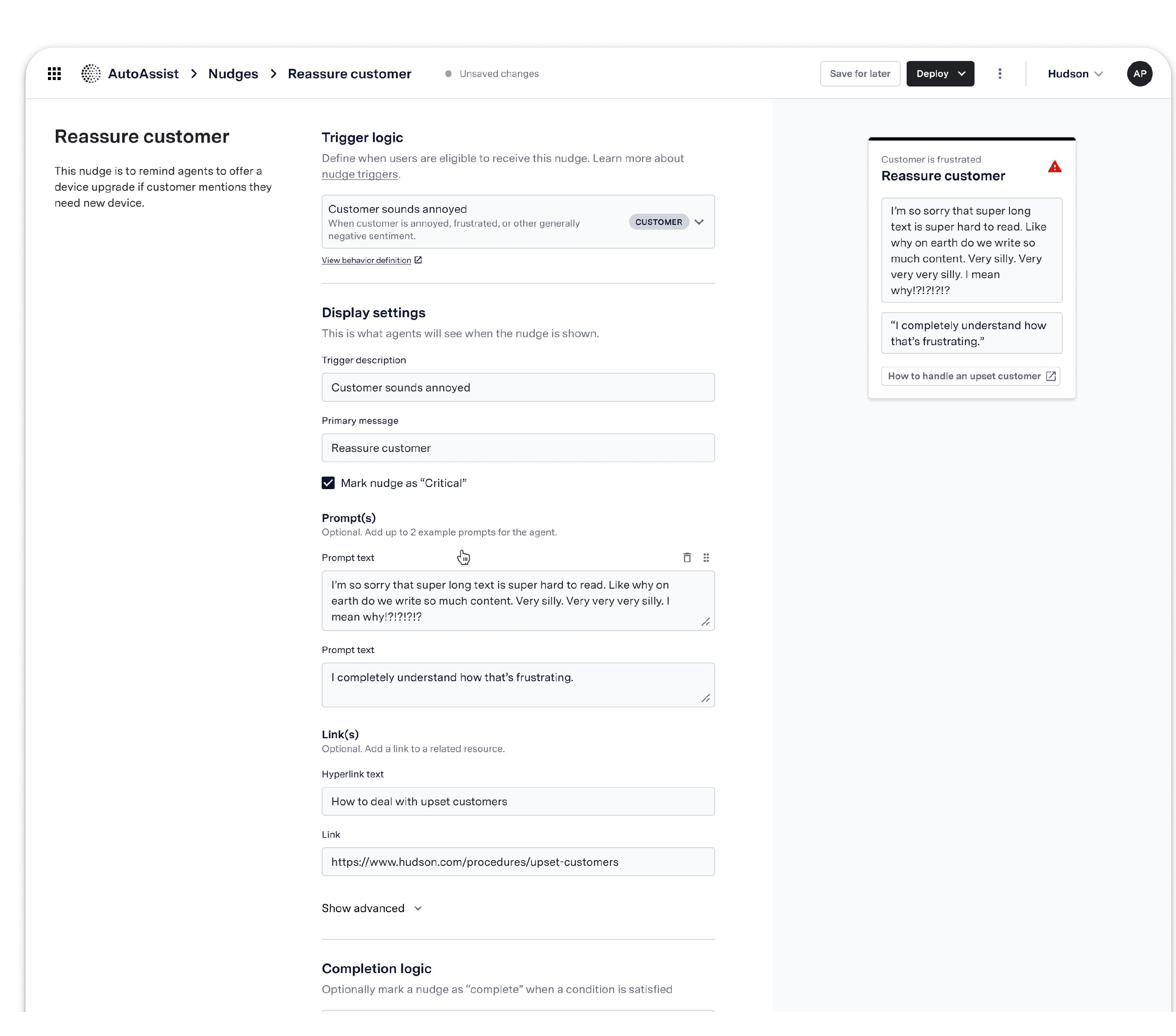
Nudge configuration: trigger logic defined by behavior, display settings, up to two example prompts, linked resources, and completion logic, with a live preview alongside.
I designed nudge configuration so admins could define triggers using keywords or sample utterances, set the dynamic context behind the guidance, link to external resources or internal scripts, configure agent feedback as positive, neutral, or negative, and set nudges to automatically dismiss once resolved.
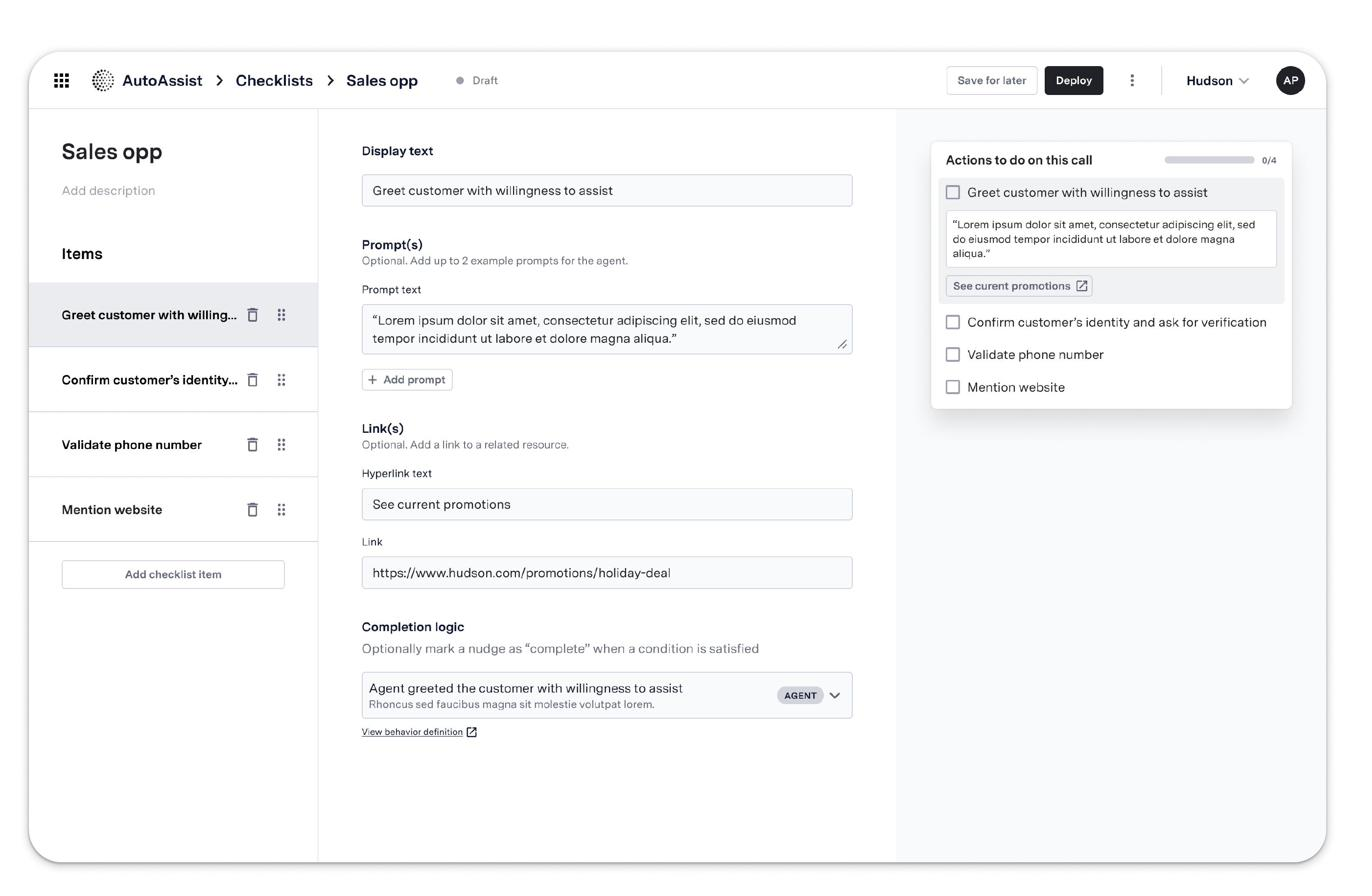
Checklist builder: defining call flows item by item, with prompts, linked resources, and completion logic per step.
The checklist builder let admins define call flows by agent type or task, mark steps complete automatically via AI detection, route specific checklists to specific agents or call types, and combine manual check-off with automatic progression where it made sense.
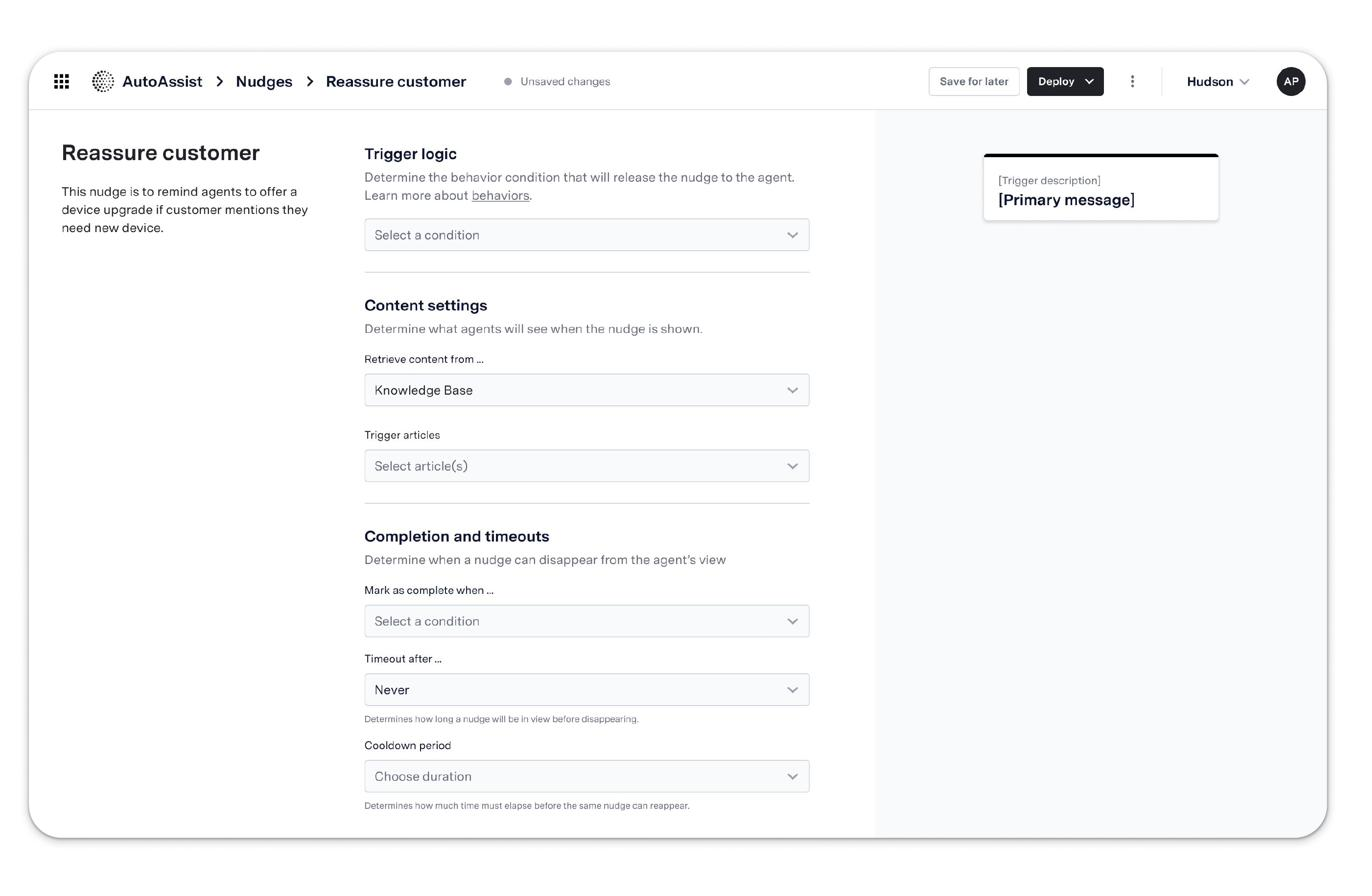
Knowledge support settings: configuring how and when knowledge base nudges appear, sourced from the company's own KB.
Knowledge support settings let admins customize responses using the company's own knowledge base, configure how and when KB-sourced nudges were shown, pre-populate search terms based on intent, and control content visibility by team, topic, or stage in the customer journey. Together, the three tools were what made it possible to scale AutoAssist across multiple clients with materially different policies and needs, without engineering in the loop for every change.
In the flow of a call
Once deployed, that configuration showed up to the agent as a card surfaced directly in their workspace, alongside the live transcript, timed to the moment the customer's request matched the trigger behavior. The hero shot above shows this in practice: a customer asks for a reservation upgrade, the agent gets the script and a link to next steps, with no need to leave the call to look anything up.
Checklists and the Knowledge Base assistant lived in the same panel, switchable depending on what the moment called for, structured guidance for agents who needed it, fast lookup for agents who just needed an answer.
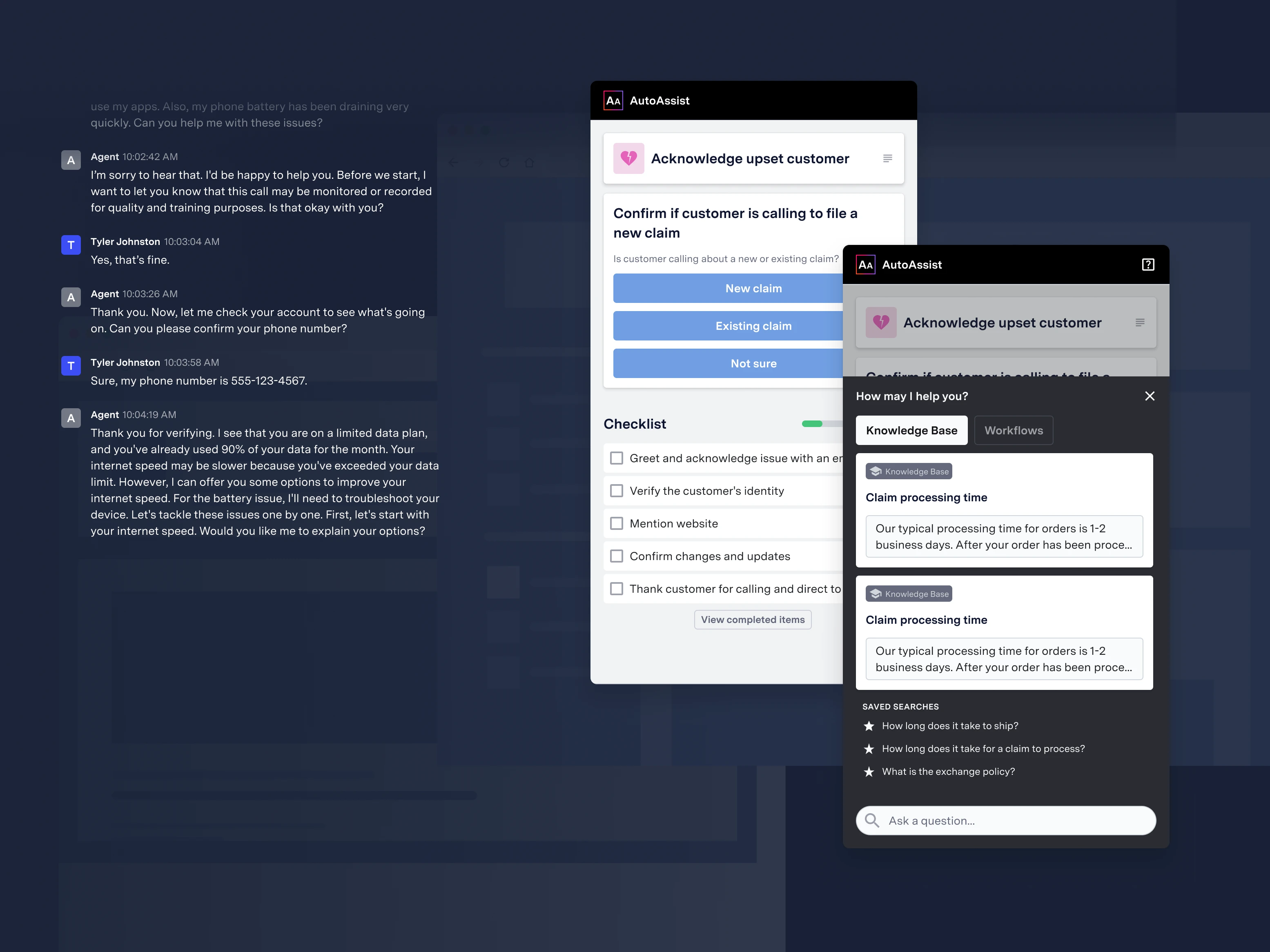
Checklist and Knowledge Base modes in the same panel: structured steps for newer agents, fast answers for experienced ones. AutoAssist was purpose-built for voice, running off a real-time transcript of the call rather than a chat log.
A meaningful part of the work was deciding what the panel shouldn't do. Should content be sorted strictly by priority? Did the call need a dedicated slot for time-sensitive alerts? Did a visual call roadmap actually help, or just add noise? Each of these went through rounds of exploration before being resolved, several were deliberately left out of the MVP.
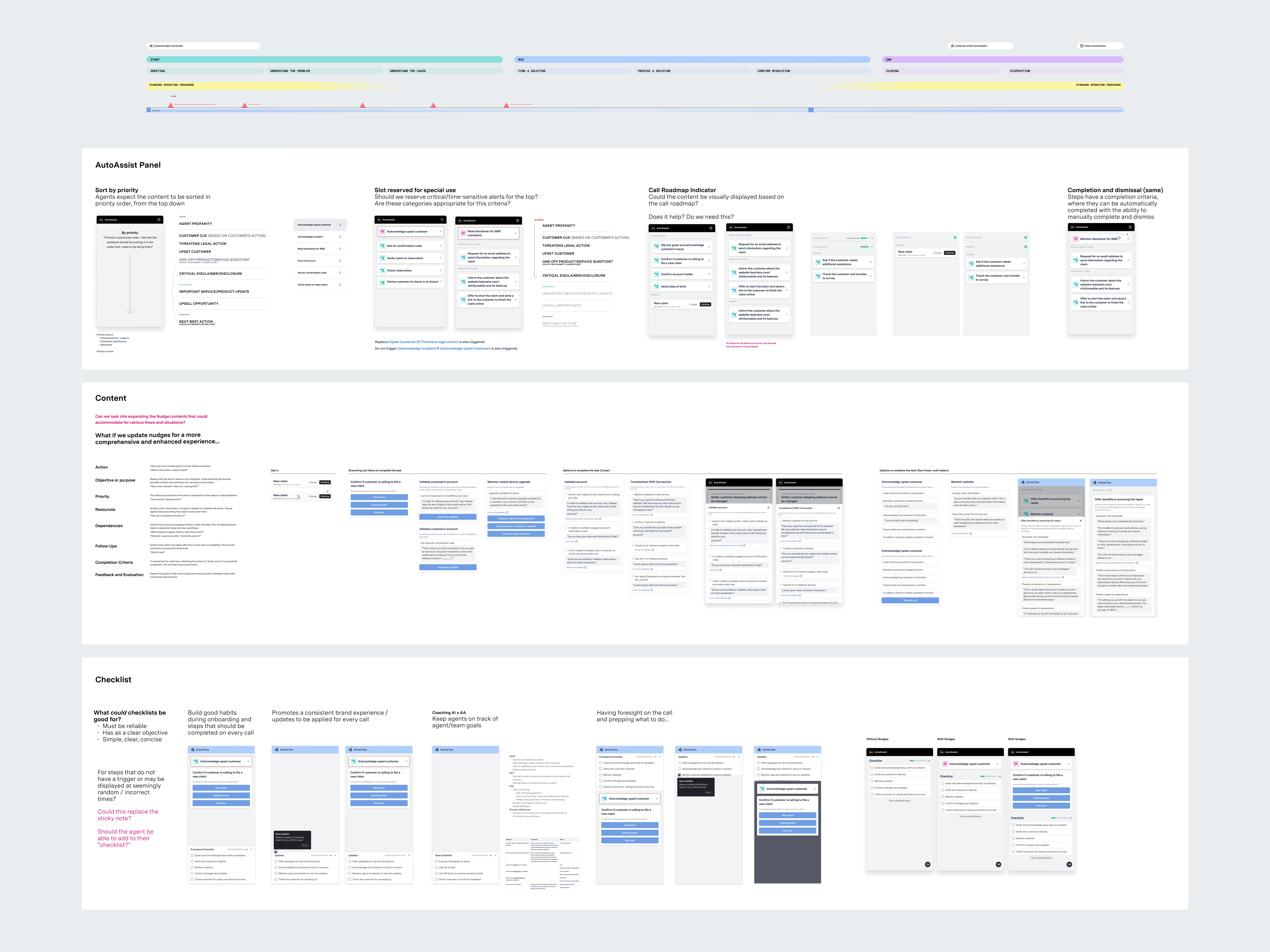
Exploration across panel layout, content variants, and checklist concepts, including open questions the team hadn't yet resolved.
Post-launch research complicated the picture in a useful way. Roughly a quarter of agents tested perceived nudges as steps in a process rather than situational coaching, expecting them to behave more like the checklist. A couple found the content patronizing, reminders of things their experience meant they'd never forget, and most experienced agents said they'd likely tune nudges out altogether once they'd internalized the basics. That tension was direct evidence for "meet agents where they are," not just an abstract principle: it's what pushed nudge configuration toward agent-segment targeting, so a tenured agent and a new hire could be looking at the same call and getting meaningfully different levels of guidance, instead of one nudge set tuned for the lowest common denominator.
Owning the roadmap
With no dedicated program manager for early AutoAssist work, I maintained the post-MVP roadmap myself: sequencing planning, design sprints, UXR, and synthesis against a dev target date, and keeping the team aligned on what was next.
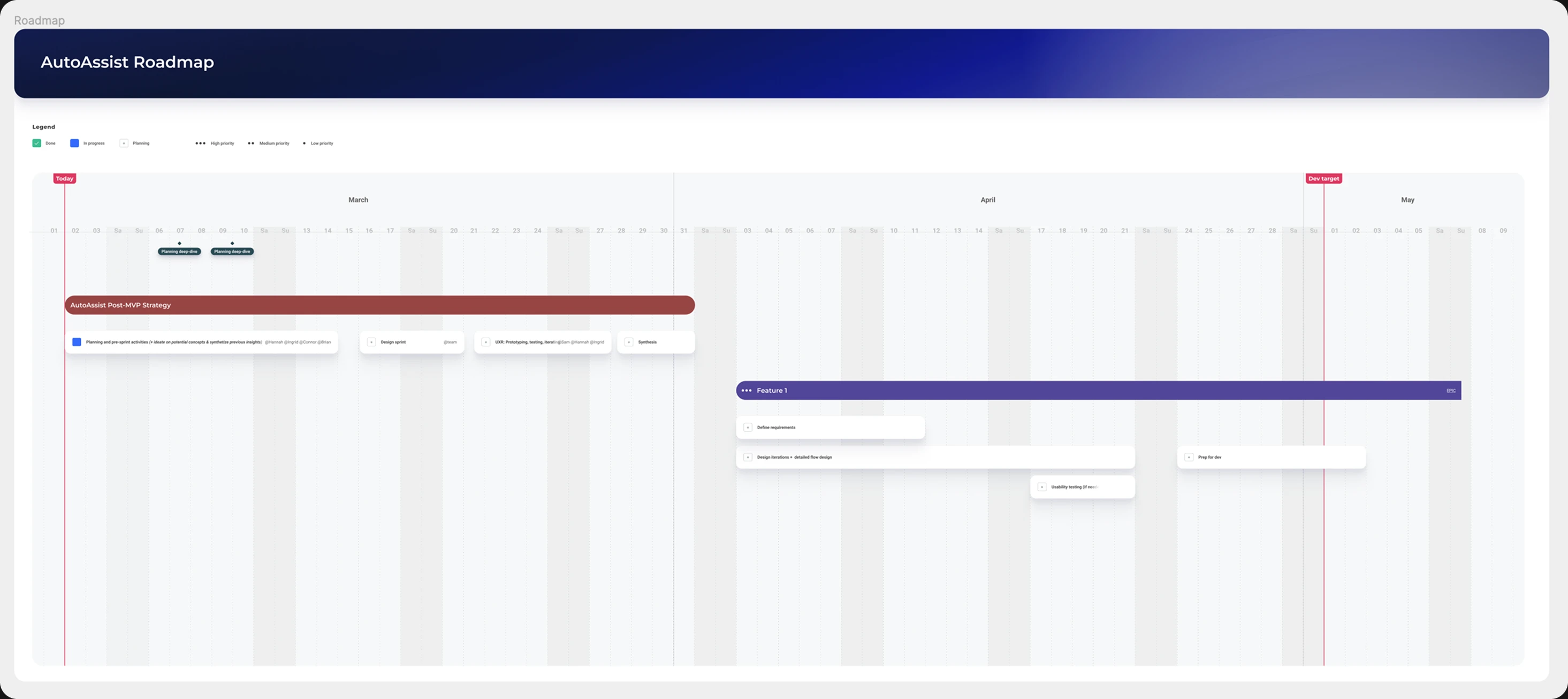
AutoAssist post-MVP roadmap, tracking planning, design sprint, and feature work against a dev target.
Designing for different roles
Research surfaced a more granular set of needs than a simple new-versus-experienced split. Agent tenure tracked closely with how much structure versus autonomy someone wanted from the product, and supervisors and admins each had a distinct relationship to it as well:
Outcomes
AutoAssist rolled out to a Fortune 500 insurance provider with more than 1,200 agents. In conversations where guidance was actually deployed, the business metrics it was designed to move, process adherence, average handle time, and CSAT, all improved.
25%
Reduction in time to proficiency during the pilot
1,200+
Agents covered in the production rollout
↓
Fewer escalations and smoother calls reported in pilot data
↑
Improved agent confidence and supervisor utilization
The pilot proved the core bet: real-time guidance, deployed well, measurably changed agent performance. What it didn't prove was that the underlying system could deliver "deployed well" consistently at the scale and variability enterprise contact centers actually operate at, and that gap between pilot success and platform-level reliability is what the next stretch of the project had to reckon with.
Where it hit a ceiling
AutoAssist laid the foundation, but over time the strategy matured past it: from a point solution toward a platform, from reactive coaching toward proactive, AI-driven guidance, and eventually from generative assistance toward autonomous agents acting on a customer's behalf.
Three tradeoffs were working against it despite thoughtful design and strong user feedback: real-time requirements were demanding at the level enterprise clients needed. Detection accuracy wasn't scalable across the range of conversations and accents and contexts a production deployment actually saw, a problem that voice made exponentially harder than a chat-based product would have faced, since accuracy depended on transcription quality and correct sentiment reads before any nudge logic could even run. And integration needs were snowflakey and resource-heavy: every client's contact center stack was different, and even with browser extension, API, and direct plugin options for deployment, every client's policies, tools, and workflows were different enough that the work didn't compound the way a platform needs it to. That combination, real value paired with a path to scale that didn't hold up, became the case for ASAPP's pivot toward GenerativeAgent.
Reflection
AutoAssist changed how the team worked more than any single feature it shipped. Design unlocked a shift from a sales-led strategy to a user-centered one, exposed critical issues, timing, relevance, trust, early enough to act on instead of discovering them in production, and built real alignment across design, ML, and engineering, three groups that hadn't previously worked this closely together. That alignment, and the willingness to say the foundation wasn't right yet rather than keep polishing a point solution, is what eventually informed the pivot toward scalable GenerativeAgent capabilities.